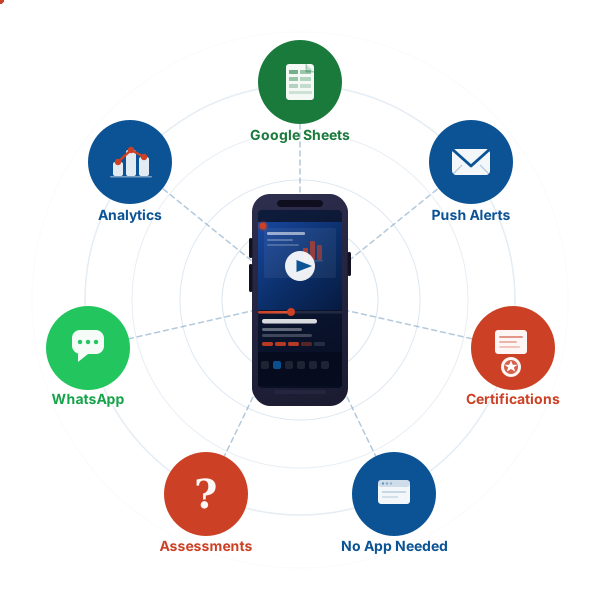
Works on any phone, no app needed

Mobile Learning Management System
for Flexible Team Training

Deliver training anywhere with a mobile responsive LMS built for frontline and deskless teams. Unlike mobile LMS open source platforms that demand technical setup, our mobile training software works instantly on any smartphone or tablet - no apps, no IT team, no complexity.

  • No app download required
  • Fully responsive on any smartphone or tablet
  • Progress syncs seamlessly across devices

Launch your LMS in 10 minutes. See exactly how.

Watch the full walkthrough - from course creation to enrolled learners in under a minute.

Step 01 · 0:00

Build your course in Google Sheets

Add content to SkillCarrot's Sheets template - paste YouTube links for videos, add quiz questions with options and answers, and include Google Slides links with slide numbers. No coding, no uploads.

Step 02 · 0:30

Publish your course in the app

Enter a course name that matches your Google Sheet, add a description, pick categories, and set start and end dates. One click connects the Sheet and your course goes live.

Step 03 · 0:50

Assign to your team

Assign the course to user groups like 'Sales' or 'Default'. Add learners individually by name and email, or upload your entire team at once via CSV.

Essential Mobile LMS Features for Effective Mobile Training

The best mobile training software and mobile responsive LMS platforms deliver these critical capabilities that mobile LMS open source solutions often struggle to provide.

Responsive Design Touch-Optimized Fast Loading Assessments Cross-Device Sync No App Needed
Design

Fully Responsive Mobile LMS Design

True mobile LMS doesn't require separate apps. Our mobile responsive platform automatically adapts to any screen size with touch-friendly interfaces that work seamlessly on smartphones, tablets, and desktops.

Any screen sizeTouch-friendly
Interactions

Touch-Optimized Interactions

All buttons, quizzes, and interactive elements are sized for fingers rather than mouse pointers. Swipe gestures feel natural with tap targets large enough to avoid frustration on smaller screens.

Large tap targetsNatural swipes
Performance

Fast Loading on Mobile Networks

Optimized content delivery for cellular networks ensures courses load quickly even on 4G connections. Compressed images and efficient code prevent frustration from slow loading times.

4G-optimizedCompressed assets
Assessments

Mobile-Friendly Assessments

Quiz questions work perfectly on touchscreens with instant feedback. Interactive elements and multimedia components create engaging, learner-friendly mobile experiences.

Touchscreen quizzesInstant feedback
Sync

Seamless Cross-Device Progress

Start a course on your phone and finish it on your laptop without losing your place. Progress synchronizes automatically across all devices for flexible learning.

Auto-syncAny device
Access

No App Downloads Required

Access training through any mobile browser without downloading apps. This eliminates IT approval processes and ensures immediate access for all employees on any device.

Browser-basedNo IT approval
Start 7-day free trial →

No credit card required.

Simple Mobile LMS Pricing, No Per-User Fees

Quality mobile training software shouldn't cost more than desktop-only platforms. Flat monthly rates that scale with your organization - no mobile add-on fees.

Premium

$89/mo

Up to 200 learners


  • Unlimited online courses
  • Quizzes and certifications
  • Report card and dashboards
  • Email support
Start 7-day free trial

Enterprise

Custom

Unlimited learners


  • Everything in Premium, plus:
  • Unlimited learners
  • White-labeling and customizations
  • Content creation services
  • Dedicated success manager
Contact us

All plans include a 7-day free trial. No credit card required. Cancel anytime.

Mobile Learning Management System Frequently Asked Questions

Common questions about delivering training on mobile devices, responsive design, and choosing the right mobile learning platform.

A mobile learning management system is specifically designed to deliver training content on smartphones and tablets with fully responsive layouts, touch-optimized interfaces, and mobile-first features. Unlike regular LMS platforms that were designed for desktop computers, a mobile learning management system prioritizes the mobile experience with appropriate text sizes, finger-friendly buttons, and layouts that adapt automatically to smaller screens. Employees can complete entire courses comfortably on their phones without zooming, scrolling excessively, or struggling with awkward navigation.
A mobile responsive LMS automatically adjusts its layout, interface, and functionality based on the device screen size and capabilities. Mobile-friendly LMS platforms merely shrink desktop content to fit smaller screens, often creating poor user experiences with tiny text and awkward navigation. A true mobile responsive LMS redesigns the interface for each device type - larger touch targets on phones, optimized text sizes for readability, streamlined navigation for small screens, and layouts that adapt intelligently. This ensures employees can learn effectively on any device without frustration.
No app downloads are required. Employees access training through any mobile web browser on their smartphone or tablet. This browser-based approach eliminates IT approval processes, works on any device regardless of operating system, and ensures immediate access without consuming device storage. Employees simply click their training link and start learning - no installation, no app store visits, no version management.
Mobile LMS open source platforms like Moodle Mobile and Canvas Mobile offer free licensing but demand significant technical resources. Organizations must handle mobile optimization manually, configure responsive designs, manage app development, maintain server infrastructure, and troubleshoot mobile-specific issues without vendor support. Commercial mobile training software like Skill Carrot provides mobile-optimized experiences out-of-the-box with guaranteed mobile responsiveness, instant deployment, automatic updates, dedicated mobile testing across devices, and professional support - eliminating the technical burden while delivering superior mobile learning experiences at predictable costs.
Test your current platform by actually completing a full course on a smartphone. Can you easily read text without zooming? Do all buttons respond reliably to finger taps? Can you complete quizzes without frustration? Does navigation work smoothly with touch gestures? If you experience any difficulties, your LMS isn't truly mobile-optimized. Many platforms claim mobile compatibility but only offer shrunk desktop experiences that frustrate mobile learners and reduce completion rates.
Mobile access removes the primary barrier to training completion - finding dedicated time at a computer. When employees can complete courses on their smartphones during commutes, breaks, or downtime, they're far more likely to finish training. Organizations typically see 30-40% higher completion rates after implementing a mobile learning management system because learning fits naturally into employees' existing mobile device usage habits rather than requiring scheduled computer time.
Yes, our mobile learning management system automatically syncs progress across all devices. Employees can start a course on their smartphone during their commute, continue on their tablet at home, and finish on their desktop at the office without losing their place. This seamless cross-device experience provides maximum flexibility and ensures employees can learn whenever and wherever is most convenient for them.
Quality mobile training software should not cost more than desktop-only LMS platforms - mobile access is a standard expectation, not a premium feature. Skill Carrot includes full mobile responsive LMS capabilities at the same flat rates as our desktop access: $29/month for up to 50 learners and $89/month for up to 200 learners. Beware of vendors charging extra for "mobile add-ons" or requiring separate mobile app development fees. True mobile LMS solutions provide seamless cross-device experiences as part of their core offering with transparent, predictable pricing.

Have more questions about SkillCarrot?

Visit the Help Center →