Mobile Learning Management System for On-the-Go Training & Development

Deliver training anywhere, anytime with our mobile learning management system. Empower your team to learn on smartphones and tablets with a fully responsive platform that works seamlessly across all devices.

Launch your mobile training program in minutes. No technical setup. Works on any device. Try free for 7 days.
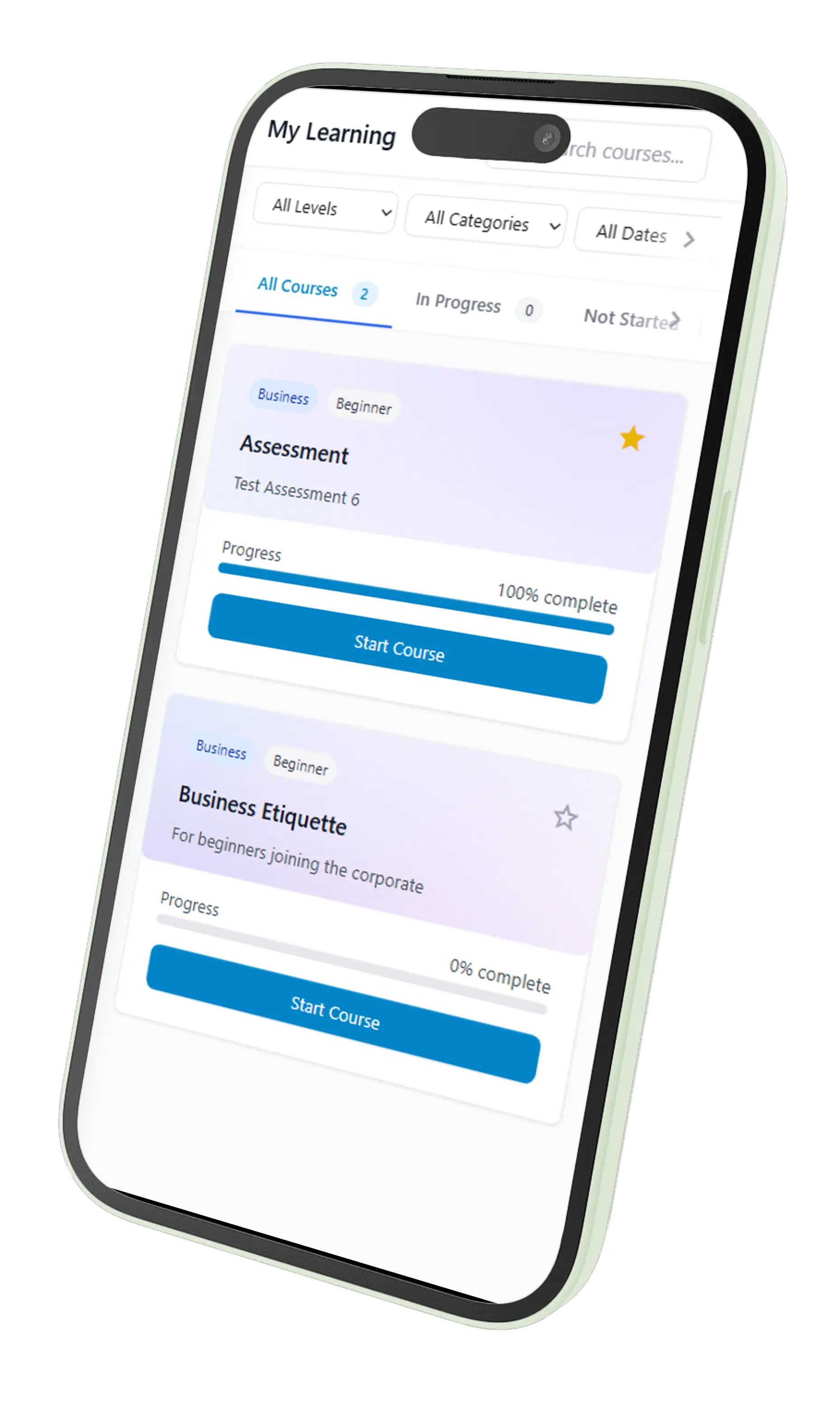
Skill Carrot Mobile Learning App Interface
Certifications icon Certifications
Google Sheets integration icon Sheets
Reports and analytics icon Reportcard
Assessments and quizzes icon Quizzes
WhatsApp notifications icon WhatsApp
Analytics dashboard icon Analytics
Email notifications icon Email

Why Organizations Choose Mobile Learning Management Systems

Effective mobile learning management systems deliver more than just desktop courses on smaller screens. Look for these critical capabilities:

Fully Responsive Design

True mobile learning doesn't require separate apps. Our platform automatically adapts to any screen size with touch-friendly interfaces that work seamlessly on smartphones, tablets, and desktops.

Touch-Optimized Interactions

All buttons, quizzes, and interactive elements are sized for fingers rather than mouse pointers. Swipe gestures feel natural with tap targets large enough to avoid frustration on smaller screens.

Fast Loading on Mobile Networks

Optimized content delivery for cellular networks ensures courses load quickly even on 4G connections. Compressed images and efficient code prevent frustration from slow loading times.

Mobile-Friendly Assessments

Quiz questions work perfectly on touchscreens with instant feedback. Interactive elements and multimedia components create engaging, learner-friendly mobile experiences.

Seamless Cross-Device Progress

Start a course on your phone and finish it on your laptop without losing your place. Progress synchronizes automatically across all devices for flexible learning.

No App Downloads Required

Access training through any mobile browser without downloading apps. This eliminates IT approval processes and ensures immediate access for all employees on any device.

Transparent Corporate Training Software Pricing

Predictable pricing for your corporate learning portal. No per-learner fees, no hidden costs- just flat monthly rates that scale with your organization.


Premium

$89
/month
  • Unlimited online courses
  • Quizzes and Certifications
  • Report card and Dashboards
  • Email support
  • Up to 200 learners
Start 7-Day FREE Trial

Enterprise

Custom
pricing
  • Everything in Premium, PLUS:
  • Unlimited learners
  • White labeling and Customizations
  • Content creation services
  • Dedicated success manager
Contact us

Mobile Learning Management System Frequently Asked Questions

Common questions about delivering training on mobile devices, responsive design, and choosing the right mobile learning platform.

A mobile learning management system is specifically designed to deliver training content on smartphones and tablets with fully responsive layouts, touch-optimized interfaces, and mobile-first features. Unlike regular LMS platforms that were designed for desktop computers, a mobile learning management system prioritizes the mobile experience with appropriate text sizes, finger-friendly buttons, and layouts that adapt automatically to smaller screens. Employees can complete entire courses comfortably on their phones without zooming, scrolling excessively, or struggling with awkward navigation.

No app downloads are required. Employees access training through any mobile web browser on their smartphone or tablet. This browser-based approach eliminates IT approval processes, works on any device regardless of operating system, and ensures immediate access without consuming device storage. Employees simply click their training link and start learning—no installation, no app store visits, no version management.

Mobile LMS open source platforms like Moodle and Canvas offer free licensing and extensive customization but require significant technical expertise for installation, mobile optimization, hosting, security, and ongoing maintenance. Organizations with experienced IT teams who need specific customizations may benefit from open source solutions. However, most organizations find that commercial mobile learning management systems deliver better total cost of ownership by eliminating technical overhead, providing immediate deployment, ensuring mobile optimization out-of-the-box, and including dedicated support—allowing teams to focus on training content rather than technical management.

Test your current platform by actually completing a full course on a smartphone. Can you easily read text without zooming? Do all buttons respond reliably to finger taps? Can you complete quizzes without frustration? Does navigation work smoothly with touch gestures? If you experience any difficulties, your LMS isn't truly mobile-optimized. Many platforms claim mobile compatibility but only offer shrunk desktop experiences that frustrate mobile learners and reduce completion rates.

Microlearning modules (5-15 minutes), short videos, visual instructions, simple quizzes, and scenario-based content work exceptionally well on mobile. Avoid long text-heavy lessons that require extensive scrolling. Break complex topics into bite-sized segments that employees can complete during short breaks. Interactive elements like touch-based interactions and tap-to-reveal information engage mobile learners effectively.

Yes, our mobile learning management system provides analytics showing device types, operating systems, and screen sizes employees use for training. This data helps you optimize content for your team's actual device usage patterns and identify employees who might need additional mobile access support. You can also track completion rates across device types to understand how mobile versus desktop access affects training effectiveness.

Mobile access removes the primary barrier to training completion—finding dedicated time at a computer. When employees can complete courses on their smartphones during commutes, breaks, or downtime, they're far more likely to finish training. Organizations typically see 30-40% higher completion rates after implementing a mobile learning management system because learning fits naturally into employees' existing mobile device usage habits rather than requiring scheduled computer time.

Yes, our mobile learning management system automatically syncs progress across all devices. Employees can start a course on their smartphone during their commute, continue on their tablet at home, and finish on their desktop at the office without losing their place. This seamless cross-device experience provides maximum flexibility and ensures employees can learn whenever and wherever is most convenient for them.

🎥 See Skill Carrot in Action (2 Minutes)